Recent Updates Page 12 Toggle Comment Threads | Keyboard Shortcuts

  • Urban 21:51 on 19 Aug. 2010 Permalink |  

    Lifestream in content stream 

    Vedno težje spremljam kje vse puščam svoj content — sprobal sem že 101 platformo za shranjevanje, deljenje ali organiziranje informacij, kak ducat pa jih tudi redno uporabljam.

    Poglejte kaj mislim: imam blog za resne poste, fotoblog za izbrane slike, Picaso za malo manj izbrane slike, še kakšen blog za čačke, Google reader shared feed, spam blog na Tumblrju, Twitter za mini statuse, Delicious za bookmarke, Youtube za favoritanje posnetkov, Instapaper za daljše članke, Evernote za zapiske, Dropbox za fajle, pa še par platform ki jih ne uporabljam zares za posredovanje vsebin (Facebook, Flickr, LinkedIn), itd., itd.

    Večina od teh storitev je pri meni zapolnila kakšno res specifično nišo. Spam postov nočem objavljati na glavnem blogu, hkrati pa jih ne morem sharati na Google Readerju (vsaj dokler niso napisani). Sharanih postov na Google Readerju — skupaj z duhovitim komentarjem, za katerega porabim več časa kot upam priznati in včasih naraste že skoraj v svoj post — pa tudi ne morem nikomur poslati kot link, ker pač nimajo permalinka (fail).

    Ta vedno večja množica opcij, ki se vse bolj prekrivajo, mi počasi že začenja iti na živce (paradoks izbire: sedaj se moram pred vsakim sharanjem še odločati, kaj bi bila najprimernejša platforma 🙂 ).

    Zares grdo pa postane, ko hočem kaj najti. Kje sem zadevo napisal, sharal ali komentiral? Dostikrat stvari hitreje na novo najdem na Googlu, kot da se prebijem čez vse svoje storitve in eno po eno preiskujem oz. ugibam ključne besede.

    In nenazadnje: storitve crkujejo1; dogajajo se zlorabe, zapirajo se accounti, in hitro lahko ostaneš brez podatkov2. Podatki pa so vredni toliko, kot je bil vreden čas, ki si ga porabil, ko si jih ustvarjal.

    Zaradi vseh naštetih razlogov sem čutil silno potrebo po tem, da ves svoj content stream nekako zberem vkup. Pa sem ga (večino).

    Najprej disclaimer: lahko bi izbral lažjo pot in inštaliral WP lifestream. Tako bi dobil strašno fin lifestream, z lepimi ikonami. (Sicer precej bolj namenjen agregaciji statusov, manj pa arhiviranju pravega contenta).

    Ker pa ga seveda nisem našel na prvi strani prvega searcha, sem se odločil za agregiranje RSS-ov z WP-o-Matic-om. Ta omogoča, da vse svoje smetenje po raznih platformah potegnem v svoj posebej za to narejen WordPress kot polnokrvne poste. S tem dobim tudi zastonj search in arhiv celotne zgodovine (in ja — WP-o-Matic zna cachirati tudi slike).

    Glede na to, da je vsa dosedanja vrednost v preteklih objavah, je bilo nujno poskrbeti za kompleten izvoz vseh starih vsebin. S tem pa je bilo več dela kot sem mislil.

    Štartal sem z Delicious.com, kjer imam 3000+ javnih bookmarkov (privatnim se zaenkrat odpovem). Delicious preko RSS daje na voljo samo največ 100 objav, lahko pa jih dobiš v celoti na spodnjem linku.

    https://api.del.icio.us/v1/posts/all

    Seveda so v delicious XMLu in ne v RSS, zato sem jih s spodnjo quick’n’dirty Ruby skripto prepisal v RSS ter nato z WP-o-Maticom importal kot file s svojega strežnika. (Skripta z if-om v 18. vrstici tudi izloči vse privatne bookmarke).

    require 'rexml/document'
    include REXML
    
    data = open('all.xml')
    xml = Document.new(data)
    root = xml.root
    
    puts '<?xml version="1.0" encoding="UTF-8"?>
    <rss version="2.0" xmlns:atom="http://www.w3.org/2005/Atom" xmlns:content="http://purl.org/rss/1.0/modules/content/" xmlns:wfw="http://wellformedweb.org/CommentAPI/" xmlns:rdf="http://www.w3.org/1999/02/22-rdf-syntax-ns#" xmlns:dc="http://purl.org/dc/elements/1.1/" xmlns:cc="http://web.resource.org/cc/">
      <channel>
        <title>Delicious</title>
        <link>http://delicious.com/urbans</link>
        <description>Delicious bookmarks</description>
        <atom:link rel="self" type="application/rss+xml" href="http://feeds.delicious.com/v2/rss/urbans?count=15"/>'
    
    count=1
    root.each_element do |e|
    	if e.attributes["shared"].to_s != "no"
    		desc = "<description>" + e.attributes["description"].to_s + "</description>"
    		puts "<item>
          <title>#{e.attributes["description"].to_s}</title>
          <pubDate>#{e.attributes["time"].to_s}</pubDate>
          <guid isPermaLink=\"false\">http://delicious.com/url/#{e.attributes["hash"].to_s}#urbans</guid>
          <link>#{e.attributes["href"].to_s}</link>
          <dc:creator><![CDATA[urbans]]></dc:creator>
          <comments>http://delicious.com/url/#{e.attributes["hash"].to_s}</comments>
          <wfw:commentRss>http://feeds.delicious.com/v2/rss/url/#{e.attributes["hash"].to_s}</wfw:commentRss>
          <source url=\"http://feeds.delicious.com/v2/rss/urbans\">urbans's bookmarks</source>
            #{desc}
          </item>"
    		count+=1	
    	end
    end
    
    puts '</channel></rss>'
    

    Naslednji je na vrsti Google Reader. Z malo brskanja najdemo tale URL:

    http://www.google.com/reader/public/atom/user%2F{USER_ID_HERE}%2Fstate%2Fcom.google%2Fbroadcast?r=n&n=100000

    Zamenjati je treba {USER_ID_HERE} z našim Google Reader user idjem. Naj vas ne zavede tako kot mene — to ni ime vašega accounta. Dejansko se rabiš zlogirat v Reader, kliknit Sharing settings in skopirat numeričen user id (slika).
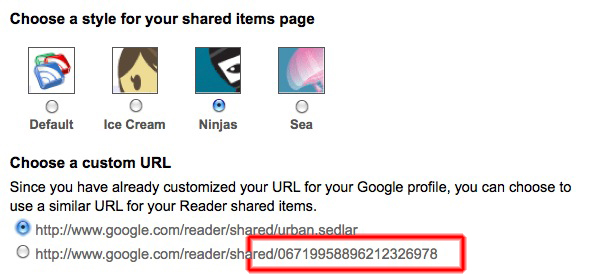
    Potem lahko številko n nastavimo na poljubno visoko in importamo celotno zgodovino (Yay, Google). Samo ne pozabit zbrisat potem tega joba in narediti enega, ki vleče samo 10 itemov, da ne bo WP-o-Matic vsakič nalagal vseh itemov.

    Za WordPress je bilo najhitreje, da sem začasno povečal output RSSa na dovolj veliko številko (Settings / Reading / Syndication feeds show the most recent n items).

    Pri Twitterju lahko potegnemo preko RSS-a do 200 updatov, če na konec RSS URL-ja dodamo ?count=n. Za več bi bilo treba kodirat in uporabit API.

    Pri parih zadevah pa sem imel tudi srečo, da še ni prav veliko objav in sem vse potegnil kar preko običajnega RSS-a.

    Saga še ni končana, precej je še storitev, ampak nekako po Paretovem pravilu sem podelal tistih 20% za 80% izkupička, tako da iskanje in permalinkanje delata zelo zadovoljivo — zadeve pa imam zdaj seveda na svojem serverju in jih lahko v prihodnje uporabim tudi za trening kakšnega bayesovega filtra (recimo za rangiranje blogpostov, ki jih pregledujem).

    Update (15.9.2010): WP-o-matic mi vsake toliko povsem naključno podvaja objave. Izgleda, da gre za nek long-standing bug, delno odpravljen, v enih primerih pa še vedno nagaja. Na hitro sem pogledal kodo in plugin res preverja unikatnost objave glede na hash, nisem pa naprej debugiral kje se zalomi, ker je napaka preveč sporadična. Kot rešitev sem zato inštaliral plugin Duplicate Post Eraser.

    1. Sajt Ma.gno.lia je tekel na enem ne-backupiranem Macu mini, in ko je ta izdihnil, so vsi uporabniki ostali brez bookmarkov []
    2. da ne omenjamo, da tudi linki umirajo; zanimiv eksperiment bo, ko enkrat preverim, koliko od mojih 3000 bookmarkov na Deliciousu še kaže na žive linke. []
     
    • dare 15:04 on 24 Aug. 2010 Permalink

      “Podatki pa so vredni toliko, kot je bil vreden čas, ki si ga porabil, ko si jih ustvarjal.”

      Love this.

    • dare 15:06 on 24 Aug. 2010 Permalink

      Drugač pa super, tole si bom tut jaz zrihtal. Nisi pa nič elaboriral kaj je narobe z WP-Lifestreamom?

      Naslednja naloga: na enem mestu zberi vse komentarje na vse sharane zadeve 🙂

    • Urban 17:32 on 24 Aug. 2010 Permalink

      WP Lifestream je super. Samo da sem štartal s temle, pa kasneje tud nisem več probaval, če bi se dalo zrihtat search, shranjevanje celotnih postov, import zgodovine in cachiranje slik.

      Drugače pa za commente še najbližje pride Disqus, ampak za sajte ki ga nimajo (recimo tale), to odpade :s .. Drugače pa nimam ideje kako bi sploh iskal commente; pri WP se načeloma lahko naročiš tud na commente na posameznem postu, ampak to niso samo tvoji.

    • dare 23:24 on 31 Aug. 2010 Permalink

      evo, zdele sem se cist slucajno spomnil, da sem ti pustil komentar in da si mogoce kaj odgovoril 🙂

      dost neucinkovita komunikacija, ce mene prasaste

  • Urban 00:40 on 28 Jul. 2010 Permalink |  

    Moon 

    Is that an image of both Earth and Moon to scale?
    Why yes, yes it is!

    And it seems it’s a bit further than I thought…

    Data and images of Earth and Moon are from Wikipedia.

     
  • Urban 22:40 on 25 Jul. 2010 Permalink |  

    Nujno in malo manj nujno 

    Moja objava za Obelisk Blog o nujnosti komunikacije:

    There’s urgent communication, and there’s one not quite urgent. As any time management book will tell you, every activity in your life can be classified according to both urgency and importance. There’s urgent and not urgent, important and not important (important to you, of course). You might have seen a diagram like this before.

    The matrix of importance/urgency. Source: Wikipedia

    The main idea is to focus on what’s important to you, and possibly make it not urgent, thus reducing stress in your life.

    However, by frantically increasing the number of communication channels, we pave the road for ever greater interruptions and distractions, which ultimately reduces the amount of time we can devote to truly important things.

    There’s been some research conducted by NASA on managing interruptions and distractions. Imagine the following scenario: an astronaut is being sent to space to perform a repair. He had to undertake a long training, which possibly required hundreds of thousands of dollars. He was sent to space in a spaceship that costs millions just to move out of the hangar (for instance, the Space Shuttle allegedly burned $450M per flight). A careful ballet of technological and human procedures had to be synchronized without a single glitch.

    Finally, the astronaut arrives at the space station, commences with the EVA, grabs the wrench and looks at the problem at hand. This is a culmination of years of effort and requires extreme concentration.

    And then he sees this, in his super hi-tech head-up display.

    Whose fault is this? The person on the other end of the line has no clue what’s at stake. The astronaut is preoccupied with more important things than worrying about setting redirections, auto-replies and changing Skype status.

    This is a hard problem, but solving it is imperative; because everyone of us is that astronaut.  Many things we do represent a culmination of our longtime efforts and sometimes we just don’t want to be disturbed.

    We believe that establishing a correct context based on environmental clues is just the right tool for the job. To determine the context of our everyday activities, a lot of information has to be gathered and evaluated. To mention just some of them, we can take a look at the person’s calendar to determine what activities they had scheduled. We can obtain their position and speed using GPS, and determine if they are on the road. And last but not least, we can bring together the everyday things,interconnected into the internet of things, to reveal some insight into what a person is doing and how intrusive a communication attempt should be.

     
  • Urban 01:17 on 19 Jul. 2010 Permalink |  

    Komunikacijsko preobilje 

    Moja objava za Obelisk Blog o komunikacijskem preobilju:

    Do you Yahoo? Skype me! Search, don’t sort. There’s an app for that. These slogans have become so pervasive you might not even notice them anymore. Every one of them is connected with a service or a product you might use for day-to-day communications. And every day there seems to be more of them.

    It wasn’t always like this. A mere hundred years ago people used to communicate face to face — in person. The telephone had already been invented, but far from commonplace. That’s practically unimaginable today, and a hundred years is not that much in the grand scheme of things.

    Yet there’s no stopping progress. Ray Kurzweil and others have analyzed the ever increasing pace of technological change and termed it The law of accelerating returns1. We stand on the shoulders of giants and have access to everything they have learned, invented and created; our successors will stand on our shoulders, and so on. In a sense, it’s giants all the way down.

    Accelerating change (source: Wikipedia)

    As the inevitable has happened and the cost of developing a communication system — a thing that once required decades and billions of dollars — has plummeted down to nearly zero, we are suddenly overwhelmed. We are experimenting and trying to find out what works. Facebook, Twitter and Skype are just the tip of the iceberg. Look at what’s below the surface: List of social networking websites and a List of instant messaging protocols/networks on Wikipedia.

    The actual problem lies in the Metcalfe’s law: the value of any network is proportional to the square of its users. So the larger the network, the more value it will provide to you. If all your friends use Skype, you literally must use Skype too, or you will be missing out on all the cool discussions that happen there. If you’re stranded alone on a dying communication channel, you’d better switch to something more modern, or you won’t have anyone to talk to. The conclusion of all this is: your friends choose your communication channels, not you. And the collective brain rarely chooses exactly what you want.

    Regardless of the availability of thousands of communication channels, even a single channel like e-mail can become a problem: getting thousands of messages a day requires immense discipline and some mad filtering skills to separate the wheat from the chaff. Many people have devised clever schemes for dealing with it, such as practicing information diet by checking email twice a day only2.

    Now multiply the plain-and-simple e-mail overload by fifty and get what awaits every single one of us in a matter of years. We can hardly imagine life without a mobile phone and texting, without e-mail, instant messaging and Facebook, and in the years to come, we won’t be able to imagine our lives without some uber-smart communication helper, which will unify all the channels and apply to them some smart filtering and prioritizing.

    And if here at Obelisk we can help make just one small step in that direction, we will consider our mission a success.

    1. http://en.wikipedia.org/wiki/Accelerating_change []
    2. as popularized by Tim Ferriss in the 4-hour Workweek []
     
  • Urban 01:09 on 13 Jul. 2010 Permalink |  

    Logiranje tipk 

    Po Wolframovi ideji, o kateri pišem v prejšnjem postu, sem tudi sam izdelal aplikacijo, ki beleži aktivnost na tipkovnici in klikanje miške. Zadeva je trivialna (lotil sem se v dobrem starem VB61 🙂 )

    'mouse & keyboard deklaracija za v BAS file ========
    Private Declare Function GetAsyncKeyState Lib "user32.dll" (ByVal vKey As Long) As Integer
    
    Public Function GetKey() As Integer
        For i = 0 To 255
            If (GetAsyncKeyState(i) And &H8001) <> 0 Then
                GetKey = i
                Exit Function
            End If
        Next i
    End Function
    
    'LOG keys and clicks ================ 
    Private Sub keytimer_Timer()
        'get keys
        newkey = GetKey
        'Replace letters with X to prevent keylogging
        If newkey > 48 And newkey < 100 Then
            dbkeycode = 88
        Else
            dbkeycode = newkey
        End If
        
        If oldkey <> newkey And newkey <> 0 Then
            'open db, insert
            Set Db = OpenDatabase(App.Path & "\data.mdb")
            Set Rs = Db.OpenRecordset("SELECT * FROM key_log", dbOpenDynaset)
            Rs.AddNew
            Rs!Time = Date & " " & Time
            Rs!keycode = dbkeycode
            Rs.Update
            Db.Close
        End If
        oldkey = newkey
    End Sub
    

    Prva finta opisane kode je, da beleži tako evente tipkovnice kot miške. Če funkcija GetKey vrne 1, 2, 3 ali 4, gre za gumb na miški, ostalo je tipkovnica. To zadevo sem nekaj časa uporabljal in beležil vse GetKey evente v MDB bazo, nakar sem postal rahlo paranoičen. MDB je vseboval vse passworde in vedno obstaja verjetnost, da taka zadeva pride v napačne roke. Zato v zgornji kodi brž replacal vse alfanumerične znake z ‘x’. Razlog, da nisem vseh, je naslednji: želel sem pustiti notri kode tipk, ki bi se izkazale za uporabne. Takšne so naprimer delete in backspace; ti dve omogočata, da beležiš kolikokrat se je uporabnik zmotil pri tipkanju; sigurno pa so še druge podobne skrite informacije.

    Že ti podatki lahko dajo dokaj dobro analizo produktivnosti glede na čas dneva, če pa bi jih uparili še z imenom aplikacije, Shazam detekcijo muzike, ki se vrti v ozadju, s podatki o količini dnevnega gibanja (recimo s FitBita), kvaliteti spanca (FitBit/SleepTracker), s TV sporedom, porabo električne energije v bajti, zunanjo in notranjo temperaturo, telesno temperaturo, srčnim utripom in/ali ročno vnesenimi podatki (splošno počutje, lakota, žeja), bi dobili pravi recept za optimalne pogoje produktivnosti ali kreativnosti.

    Problem take rešitve je, da predstavlja precej velik vdor v zasebnost uporabnika. Edina sprejemljiva varianta je, da reč zapakiraš v desktop aplikacijo, s tem pa izgubiš vse prednosti oblaka: spremljanje več naprav, centraliziran pregled statistike, ipd.

    Glede na to, da tudi sam takih podatkov ne bi zaupal nikomur (in da sem takoj odinštaliral Rescue Time, ki podobne podatke zbira na webu), vidim kot edino možnost privaten oblak. Mnogi (tudi Eric Schmidt) menijo, da bo regulativa na tem področju šla po sledeh bank, in da se bo nivo zaupanja do ustreznih ponudnikov dvignil do te mere, da bomo podatke “nakazovali” brez strahu, da jih bo kdo ukradel. In ko bo mogoče najeti simpl sef za podatke, bo tudi take občutljive zadeve možno preko VPN shranjevati od kjerkoli.

    1. ta je še ena antična, z začetki v 2006 kot aplikacija, ki je bila po želeni funkcionalnosti na las podobna današnjemu ManicTime-u []
     
    • dare 09:55 on 13 Jul. 2010 Permalink

      tipu se je res odprl…

    • Urban 10:47 on 13 Jul. 2010 Permalink

      🙂 mwahaha.. ma mi je prov škoda vse te kode in idej, ker že men mal peša spomin 🙂

c
Compose new post
j
Next post/Next comment
k
Previous post/Previous comment
r
Reply
e
Edit
o
Show/Hide comments
t
Go to top
l
Go to login
h
Show/Hide help
shift + esc
Cancel
