Recent Updates Page 3 Toggle Comment Threads | Keyboard Shortcuts

  • Urban 11:00 on 17 Nov. 2012 Permalink |  

    Least popular 192.168 networks 

    Having a home VPN server on the default 192.168.1.0 subnet is a pain due to address collisions. Indeed, if I haven’t bothered to change it before, why should I expect a random cyber cafe/hotel/company or anyone at all to use a different default subnet?

    So I’ve decided to renumber my home network. But first, I wanted to find a 192.168.x.0/24 subnet with the lowest popularity, so I could minimize the potential collisions.

    I asked Google1, querying all the default gateways2 of the form “192.168.x.1”, and got the following result (x axis is the number of Google results, in log scale). Click to enlarge.

    Keep in mind that the Google AJAX search API used here returns somewhat strange numbers, which are by a factor of 10 lower than in plain old desktop Google search, but at least that factor appears to be consistent (I checked the first 10 IPs).

    In fact, the data here is not intuitively comprehensible. The pie chart below is better, showing that anything except the 7 subnets in the legend should give you a sufficiently low probability of collision (lower than 1%). Click to enlarge.
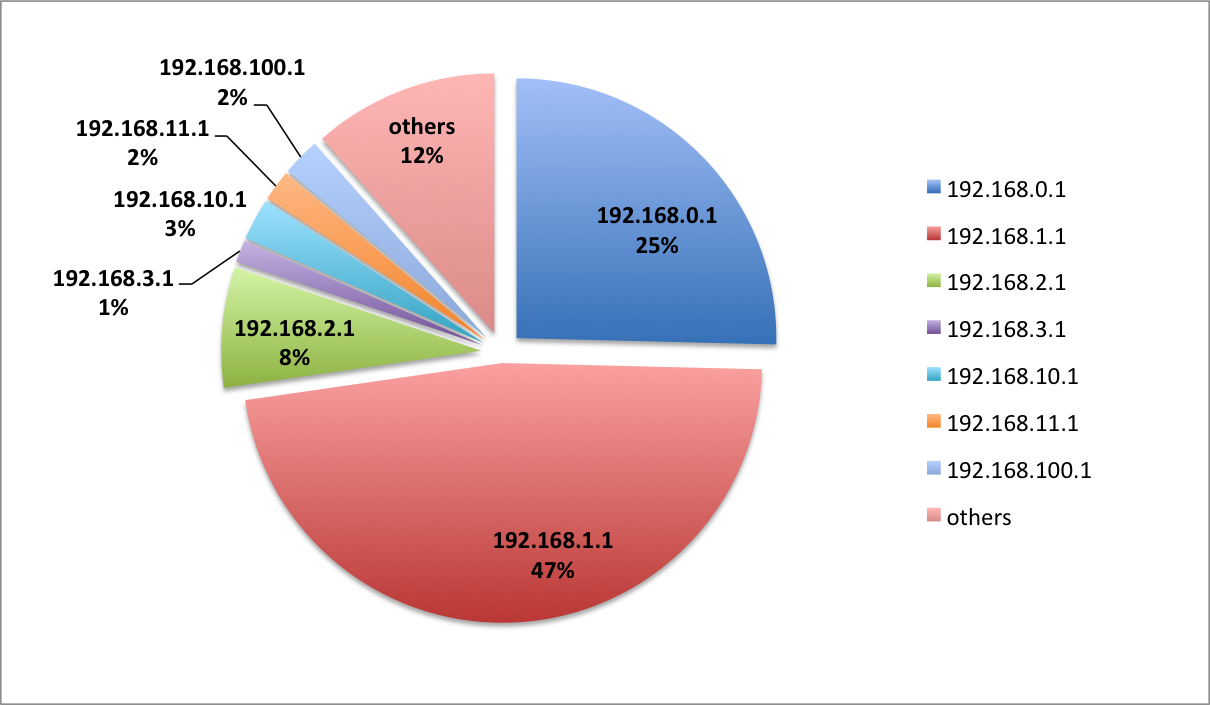
    Note: all data as of Nov 14 2012. Here’s the raw dataset.

    But renumbering the network is a lot of work, really, so maybe I should just pick something from the 10 or 172 subnets. These seem to be much rarer (especially 172). Of course I’d have to retrain my muscle memory.

    There’s other options as well, but I don’t find them very practical. For example, using a 1:1 NAT to provide additional address mapping to VPN users just complicates the network, not to mention firewall rules. And using static client side routes is another non-option, since it can’t be used on locked down devices, such as  iPhones and iPads. So renumbering it is.


    1. I used Google AJAX Search API, stuck the URL into a Ruby script and iterated from 0 to 254 []
    2. I made two hopefully reasonable assumptions, namely that the network popularity is proportional to the amount of people talking about its default gateway, and that the default gateway is has the .1 address []
     
  • Urban 09:00 on 14 Nov. 2012 Permalink |  

    Smart bulbs (and other musings) 

    As a gadget enthusiast I instinctively clicked “Back this” when I saw the Lifx project on Kickstarter. I was torn, however, when I saw the public outcry regarding the founder and his alleged incapability to ship a cardboard box. I hesitated until the last day, not sure whether to keep the pledge or cancel it.

    Meanwhile, I happened to stumble upon another similar project at the Mini Maker faire at Strataconf NY–the Visualight. It instantly caught my eye and one of the founders explained to me how he was just finishing the writeup when the Lifx project came online.

    So I said, “convince me that you’re better and I’ll cancel the Lifx pledge and back yours instead.”

    He did give me a pitch with plenty of differentiation, saying that Visualight is a great data visualization tool which sports open APIs for all the communication. Who needs disco effects and music visualization, when you can have the light change color according to weather, stocks or subway service (kind of like the Nabaztag / Karotz).  He also showed me a working prototype.

    But right there, I couldn’t decide which one had a better premise. It all boiled down to the “smart bulb, stupid network” (Lifx) vs. “smart network1, stupid bulb” (Visualight) dilemma, and I got an instant case of analysis paralysis.

    I started thinking that I’ve seen the story many times before.

    For example, in computers.

    In computing we started off with a centralized design (mainframes) and dumb terminals. Then the brain moved to the local box (PC), and now, finally, it’s moving back to the network (cloud), with the clients getting more and more stupid once again (just take a look at Chromebook).

    Something similar seems to be happening in mobile phones, with the brain first moving from the network to your iPhone, and now slowly creeping back into the datacenter (Siri, anyone? Or maps with server-computed turn-by-turn?)

    But right now the infrastructure is not quite there yet. It’s not infallible and 99.999% robust, and it pisses us off when Siri can’t take a simple note. Imagine you can’t turn on your light at 2AM because your server’s down.

    So that’s what I was thinking while standing there, staring blankly into empty space. I decided that (at least my) world might not be ready for a remote controlled stupid bulb.. yet.

    And a couple of days later, Philips announced the Hue. It’s severely limited (iOS only, and the bulbs are not self-sufficient; it uses an additional ethernet-connected gateway which communicates with bulbs via ZigBee). However, with its market cap, lighting expertise, reputation and virtually the same price point, Philips might have just eaten the lunch of every other lighting startup.

    Then there’s another issue where Philips wins: safety. A product like that, done wrong, can easily burn down your house. I’ve already seen the remains of an exploding Chinese USB charger, and this is indeed a great concern. Compared with cheap Chinese LED bulbs that I bought en masse years ago, such a smart bulb has to be always on to benefit from its embedded computer. If you switch it off, it’s dead.

    So we’ll have to wait and see who’s going to be the winner here. The race is long. In fact, it’s never-ending.

    And no, I haven’t cancelled the pledge.


    1. and here, by “smart network” I mean “a server” []
     
  • Urban 22:23 on 16 Jun. 2012 Permalink |  

    Sunspots 

    Today’s sunspots.

    Sunspots

    Sunspots 2012-06-16; click to enlarge

    Some notes on taking the picture: I used a budget Celestron Powerseeker 127eq with a bunch of DIY accessories. The small aperture of the front mask was covered with mylar film; instead of the eyepiece I used a T-mount, made from a camera body cap and a piece of PVC sink pipe, held together by plumber’s putty. It sounds pretty much like MacGyver, and it was. Why complicate so much, you ask, if you can get a T-mount for pocket change? Because you can’t get one the last day when you finally decide you want to take pictures of the venus transit.

    Of course, to prevent shaking, a 10s timer and mirror lockup had to be used. Finally, the photo was cropped and adjusted for better contrast.

    Compare that to the one NASA captured.


  • Urban 20:00 on 13 Jun. 2012 Permalink |  

    Backing up large zpools 

    I’ve just recently heard the term “data gravity”, which implies that large amounts of data are next to impossible to move. I’ve experienced this with my ZFS NAS, which makes heavy use of compression and deduplication to cram tons of backup VMWare images to a 2TB mirrored volume.

    To back it up I simply did what seems to be best practice around the Internets: I attached a USB volume, used zfs send to synchronize only the changes between the most recent common snapshots, and that was it. However, the process took a long time.

    Fast forward a couple of months, when I naively played with the thing and tried virtualizing it (VMware + raw device map), in the process corrupting the zpool so badly, that it had to be restored from backup in its entirety.

    If I thought syncing the changes to USB took long (days), this took weeks. That’s when I learned about mbuffer to speed up zfs sync, but dedup and compression still took their toll. Plain uncompressed and undeduped file systems synced with normal USB read speeds (about 15MB/s), while dedup slowed zfs send down by two orders of magnitude.

    So I’ve resorted to a little advertised approach, which has so far also proved to be the most fool-proof. It’s using the zpool resilvering mechanism for what’s called a split mirror backup.

    It goes like this: you create a 3-way mirror. Pull out one disk and shelf it as backup. When you want to “refresh” your backup, plug it back in and put it online using something like zpool online tank c5t0d0.

    A great surprise was how smart the resilvering process is. It doesn’t rewrite the entire disk, but only copies the changes. There’s a lot of advantages over zfs sending, at least from my point of view:

    • it’s fast, without the need to fiddle with mbuffer or copy each filesystem individually
    • no snapshots needed to serve as reference for incremental zfs send
    • creates an exact copy (entire zpool, with all the properties intact), so if your server burns, the backup drive can immediately serve as a seed for a new server
    • if you pull out a disk during resilvering, there seems to be no harm and the process just continues next time

    The only drawback is that your pool is always in a degraded state, because a disk is missing. But that’s really a minor inconvenience.


    • Damian Wojsław 09:38 on 15 Jun. 2012 Permalink

      Hi
      I’d recommend not using deduplication, as it can get you in a lot of trouble if not used carefully. What is often suggested solution is to create a separate zfs filesystem for golden image of a virtual machine and then provision creating zfs clones. You have a kind of a cheap deduplication, without the additional trouble of DDT.

    • Urban 12:03 on 16 Jun. 2012 Permalink

      Hi, thanks for your comment 🙂

      I’m more and more aware of the troubles of dedup, and have already disabled it on most filesystems where the performance penalty outweighs the benefits. 

      However, I have a single zfs serving as destination for remote backups of vmware images; since the data is highly redundant, the dedup factor is large; there’s also not that much unique data, so the ddt can easily fit in ram. Last but not least, the performance of this archiving process is absolutely *not* critical, and if everything blows up, it’s just backups 🙂

      But I do have important data on other filesystems in the pool and I still want to back up the entire thing to an external disk. Do you see any potential problems with the split mirror backup I described? What mechanism do you use?

    • Collin C. MacMillan 04:41 on 8 Jul. 2012 Permalink

      Beware this form of backup as it will not survive disk corruption (i.e. non-recoverable hard or soft errors) on the “backup” disk. It is also no good for more complex pool configurations… 

    • Urban 15:07 on 8 Jul. 2012 Permalink

      Thanks for your comment,

      actually, I agree on both counts. I’m aware it only applies to a very narrow set of mirrored pool configurations, and I’m also aware this is no enterprise-grade solution. However, for a home server it provides a quickfix solution without the hassle and cost of remote replication or a tape unit.

      And on the plus side, soft errors will at least be detectable..

    • Asdf 23:04 on 10 Oct. 2012 Permalink

      Instead of dedup, you can put one VM in a separate zfs filesystem, and then you clone it (via snapshot). Each clone will read from the master zfs filesystem but store changes on it’s own filesystem. This way you can have many clones of one VM. For instance, setup Windows2012 server as a master. In one clone you install SAP, in another you install Oracle DB, etc. So all clones will read from the win2012 master snapshot.

      Kind of dedup.

  • Urban 16:58 on 9 Jun. 2012 Permalink |  

    Moon 

    I still have a telescope lying around, with an unfulfilled mission to capture last wednesday’s Venus transit. So here’s a shot of the Moon, captured today, early in the morning. The quality is not great, but the craters are nicely visible near the terminator line. The aperture was stopped down using the front cover mask which seemed to mitigate some of the effects of bad seeing and average optics.

    Click for larger image.

     
c
Compose new post
j
Next post/Next comment
k
Previous post/Previous comment
r
Reply
e
Edit
o
Show/Hide comments
t
Go to top
l
Go to login
h
Show/Hide help
shift + esc
Cancel